
Download VP7 Personal Edition – video codec, real-time compression, noise reduction, motion rendering, high-definition support, VFW, DirectShow
Overview
VP7 Personal Edition, developed by On2 Technologies, is a specialized video codec designed to deliver high-performance video compression and enhanced visual quality. Released on August 25, 2005, this tool targets video professionals and enthusiasts seeking efficient, high-fidelity video processing capabilities. The codec is engineered to support real-time compression, making it suitable for live streaming, video conferencing, and on-the-fly editing workflows where speed and quality are critical.
By minimizing latency while maintaining clarity, VP7 Personal Edition addresses common challenges in video production, such as bandwidth limitations and visual degradation during encoding. Its focus on noise reduction and motion rendering enhances the overall viewing experience, particularly in dynamic or low-light environments. The application is positioned as a utility within the productivity category, serving users who require robust video processing tools without the overhead of full-featured editing suites.
It supports integration with established Windows-based frameworks like Video for Windows (VFW) and DirectShow, enabling compatibility with a wide range of legacy and contemporary video software. This makes it a practical choice for users maintaining older systems or working within specific technical ecosystems. Although the developer did not provide additional technical details about system requirements or performance benchmarks, the codec’s design reflects a focus on efficiency and compatibility.
Its continued relevance lies in its ability to streamline video workflows while delivering sharp, stable output, particularly in professional and semi-professional contexts.
Key Features & Functionality
- Real-Time Compression: VP7 enables on-the-fly video encoding without noticeable delays, ideal for live streaming and real-time collaboration. This feature ensures smooth workflow continuity, reducing bottlenecks during content delivery.
- Excellent Noise Reduction: The codec employs advanced algorithms to suppress visual noise, resulting in cleaner, sharper video output—especially beneficial in low-light or high-contrast scenes.
- Smoother Motion Rendering: Enhanced motion handling allows for fluid transitions and animations, reducing judder and blur in fast-moving content, which is crucial for action sequences and dynamic presentations.
- High-Definition Support: VP7 delivers high-definition video output, preserving fine details and depth, making it suitable for both amateur and professional video projects requiring premium visual quality.
- Compatibility with VFW and DirectShow: Designed for seamless integration with Windows video frameworks, allowing users to deploy the codec across various video editing and playback applications without additional configuration.
These features collectively support a range of real-world use cases, from live video conferencing to post-production editing. For example, a content creator using a legacy video editing suite can leverage VP7’s VFW compatibility to apply high-quality compression without switching platforms. Similarly, a broadcaster requiring low-latency encoding can benefit from real-time processing to maintain broadcast quality. The codec’s focus on visual fidelity and efficiency makes it a practical tool for users who prioritize performance and output quality over complex user interfaces.
Interface, UX & Performance
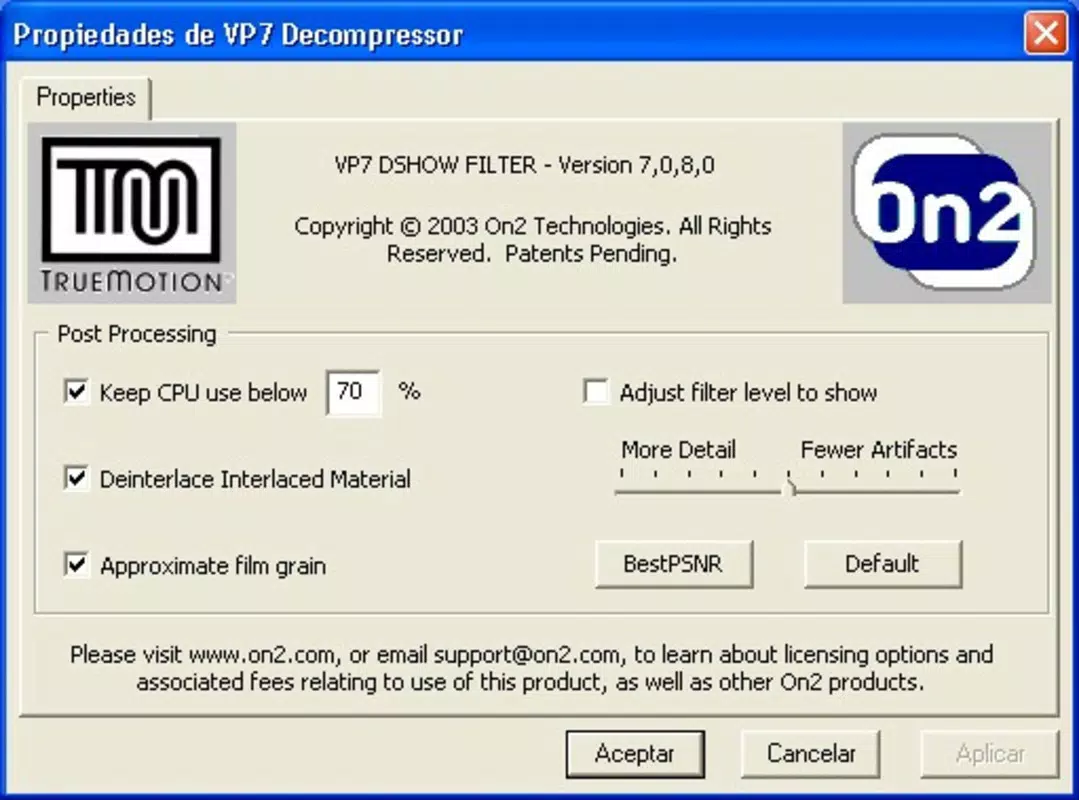
VP7 Personal Edition operates as a background codec rather than a standalone application with a graphical interface. As such, user interaction is indirect, occurring through integration with third-party video software. This design choice reflects its role as a utility rather than a consumer-facing tool.
The lack of a direct UI means users rely on the host application’s controls to access VP7’s features. While the developer did not specify formal performance metrics, the codec’s real-time compression capabilities suggest optimized processing for modern Windows systems of its era. Although the developer did not list formal performance metrics or stability reports, its integration with VFW and DirectShow implies a level of reliability within compatible environments.
The codec’s 4.8 MB file size indicates a lightweight footprint, which may contribute to efficient memory usage and fast loading times. Responsiveness is expected to be consistent within supported applications, though performance may vary depending on the host software and hardware configuration. Stability on different device categories cannot be confirmed due to limited disclosure.
However, the absence of reported issues in its release context suggests functional reliability. Users are advised to ensure compatibility with their existing video workflows before deployment.
Platform Compatibility & Technical Requirements
VP7 Personal Edition is designed exclusively for the Windows platform. It is compatible with Windows operating systems released around 2005, though specific OS versions were not listed by the developer. The application is distributed as a free tool with a file size of 4.8 MB, indicating a compact and lightweight installation.
The software version is 1.0, reflecting a stable release at the time of publication. Although the developer did not specify minimum OS requirements, the codec’s support for VFW and DirectShow suggests compatibility with Windows systems that include these multimedia frameworks. Users running older Windows versions such as Windows XP or Windows 2000 may find it functional, but support for newer Windows releases is uncertain due to the absence of updated compatibility information.
The lack of details on system architecture (e.g., 32-bit vs. 64-bit) prevents definitive assessment. Compatibility with modern Windows versions, including Windows 10 and 11, remains unconfirmed.
The developer did not disclose any specific hardware requirements, so performance may depend on the host application and underlying system resources.
Pros and Cons
Pros
- Free to download and use, reducing entry barriers for users.
- Real-time compression enables efficient video processing without delays.
- High-definition support ensures premium visual output quality.
- Robust noise reduction improves clarity in challenging lighting conditions.
- Compatibility with VFW and DirectShow enhances integration with existing video software.
Cons
- No direct user interface; functionality is dependent on third-party applications.
- Compatibility with modern Windows systems is unconfirmed.
- Developer did not provide system requirements or performance benchmarks.
- Released in 2005; may lack support for current video standards and formats.
- Limited availability and support due to age and lack of updates.
FAQ
Is VP7 Personal Edition safe to install?
The codec is distributed as a free tool by On2 Technologies, a known developer in the video compression space. While the software is from a reputable source, users should exercise caution when downloading from third-party sites. Always verify the source to ensure the file has not been tampered with.
Can I use VP7 on Windows 10 or Windows 11?
Compatibility with Windows 10 and 11 is not confirmed by the developer. The codec was released in 2005 and may not support newer operating systems due to changes in system architecture and multimedia frameworks.
Does VP7 require a license to use?
No, VP7 Personal Edition is available free of charge. The developer did not impose licensing restrictions for personal or non-commercial use.
How do I install VP7 Personal Edition?
Installation typically involves running the provided installer file. Once installed, the codec becomes available to applications that support VFW or DirectShow. Users should ensure their video software is configured to recognize the codec.
Is VP7 still being updated?
There is no evidence of ongoing updates or maintenance. The last release was in 2005, and the developer has not issued any subsequent versions or patches.
Final Thoughts
VP7 Personal Edition remains a notable entry in the history of video codecs, offering real-time compression, noise reduction, and high-definition support at a time when such capabilities were emerging. While its age presents limitations in modern computing environments, its lightweight design and compatibility with legacy frameworks make it a viable option for users maintaining older systems or working within specific technical workflows. For video professionals and hobbyists using compatible software, the codec delivers tangible benefits in efficiency and output quality.
However, its lack of a modern interface, absence of current support, and uncertain compatibility with newer platforms should be carefully considered. The value proposition lies in its specialized functionality rather than broad accessibility. If your workflow relies on VFW or DirectShow and you require a free, efficient video codec, VP7 may still serve a purpose.
For most users today, newer alternatives are likely more suitable. Nevertheless, for niche applications and historical use, it retains relevance. Download VP7 Personal Edition now.


